Lately, it’s been even harder than before to secure any time for drawing.
I got so lost on what to do that I decided to try an unconventional, roundabout approach. Here’s how it went down.
Gotta Start with a Situation Analysis, Right?
Since drawing is just a solo hobby for me, I don’t have any of the usual deadlines or quotas. It’s a super easy environment to slack off in.
I’ve analyzed the “monsters” that steal my drawing time before, but I really think that’s not the only problem.

The core issue is not having that “must-do-this-or-die” line, since it’s not work.
You might suggest I should just create a doujinshi or enter an event, but honestly, I’m not even close to that level of drawing, and I don’t have any specific work I want to distribute.
That said, after attending my first original content event, I realized I really love small acrylic keychains, so I definitely want to try making one someday. And business cards too.
Anyway, I got sidetracked. Since I can’t set up a regular event schedule, I have to figure out another way.
And then it hit me.
I’ll force myself to follow a quota.
What Kind of Quota Should I Use?
I used to do daily drawing exercises (like figure drawing) to try and get in the habit.
Plus, having someone who critiqued my work once a month really helped me keep my motivation high.
The critique is off the table now, but should I go back to doing the same kind of figure drawing?
The answer is no.
While it’s super effective for building up my silhouette-catching skills, the one instructor who taught me told me, “First, get good at drawing cute faces,” and that phrase keeps spinning in my head. I’d rather focus on drawing a proper character illustration than figure drawing, which I feel (maybe wrongly) doesn’t help with face practice.
For character illustrations, I think it’s more beneficial to carefully complete one piece at a time rather than focusing on volume, so each piece takes a decent amount of time.
Also, when I was thinking about habit-forming, I decided I should try binding myself with time.
Time.
A whole month seems like too long a span, so I figured I’d try imposing a weekly time quota for starters.
So, how many hours can I actually spend drawing in a week?
Work keeps me busy, and with the end of the year approaching, I’ve got more drinking parties coming up.
But even so, I’m optimistically figuring I can squeeze in about 1.5 hours on an average weekday, plus maybe double that on the weekends. That totals up to 13.5 hours for the week.
To people who are serious about drawing, that’s probably nothing, but for me, that’s maxing out my effort.
I’m gonna try tackling these 13.5 hours starting in December and see what reality looks like.
How to Manage 13.5 Hours?
A regular person would probably think of a stopwatch, right?
Not me.
I’d totally forget to press it somewhere and the management would just slip away. I know myself.
So, I decided to manage it with a custom clock that only counts down while I’m actively using Clip Studio.
And since there’s no such convenient clock out there, I built one myself.
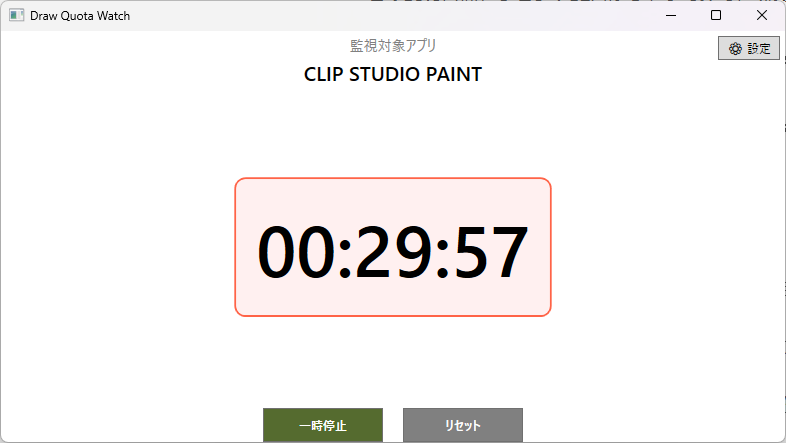
Specs
Looks aren’t a priority. The design is simple and has these specs:
- A desktop application running on Windows 11.
- The target time is set in minutes.
- The target time decreases every second only when CLIP STUDIO PAINT (Clip Studio) is active AND not idle.
- Once the target time runs out, the text on the screen turns red and starts adding up the overshoot time.
- The remaining time is saved even if the app is closed until I reset or set a new target.
That’s it. Simple.
Operation
It’s super simple to use: Hit the settings button to set the app to monitor and your target time, then just draw a bunch in Clip Studio.
If you stop drawing, the countdown stops.
In the video, the windows are layered, but in reality, it’s fine no matter where the clock is.
As you can see in the video, the countdown stops when I stop drawing, and even when Clip Studio is active, the countdown pauses if I don’t touch the pen, mouse, or keyboard for a set period.
Also, even though I can’t do it, this might be useful as a timer for one-hour drawing challenges (Wandoro).
But I can’t do it!
As a side note, for my current drawing setup: I have three monitors lined up horizontally. I draw on the middle monitor. I use an XP-Pen Deco Pro LW (Gen2) pen tablet and a TourBox NEO as my left-hand device. I’ll probably keep this new app on the left monitor, where I usually dump YouTube Music and Discord. When I’m drawing, the right monitor is for searching references or casually streaming videos.
Using the 13.5 Hours
I’m gonna try burning through these 13.5 hours starting tomorrow.
Yeah, I know. I totally get it: “You should have spent the time making this app on drawing instead.”
Yep.
But, if I keep doing things the way I’ve been doing them, I’ll only draw as much as I have been. So, I figured I’d just try everything I could think of.
Anyway, the main goal is to finally be able to draw character faces properly.


Comment