I usually draw on my PC, and I’ve been using a TABMATE as my left-hand device for the longest time.
Tbh I’ve always lowkey wanted to try the TourBox, but since it’s kinda pricey for a left-hand macro pad, I hesitated for a long time. But then I saw they were having a 25% OFF sale, so I just impulse-bought it lol.
The one I grabbed is the TourBox NEO.

Compared to the ELITE version, if you ignore the color and the texture of the body which don’t really affect functionality, the main differences are that it’s wired only, and the dial doesn’t have haptic feedback. That’s about it.

The number of buttons and everything else is exactly the same.
Honestly, I kinda did want that haptic feedback, but when asked if I was willing to drop an extra 15k JPY just for that… yeah, I definitely backed out lol.
Trying out the CSP Presets 🎨
The big selling point of the TourBox is that you can map over 400 actions by combining buttons and dials. But tbh, even if I set up 400 commands, there’s no way my brain is gonna remember all that.
So, I figured I’d just start by using the default Clip Studio Paint (CSP) presets that came with it.
By default, the dials are set to zoom in/out, rotate the canvas, and change brush sizes, and the other buttons are mapped to pretty common, useful functions.
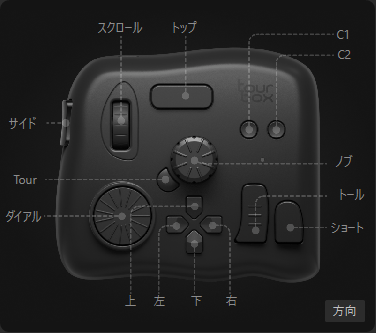
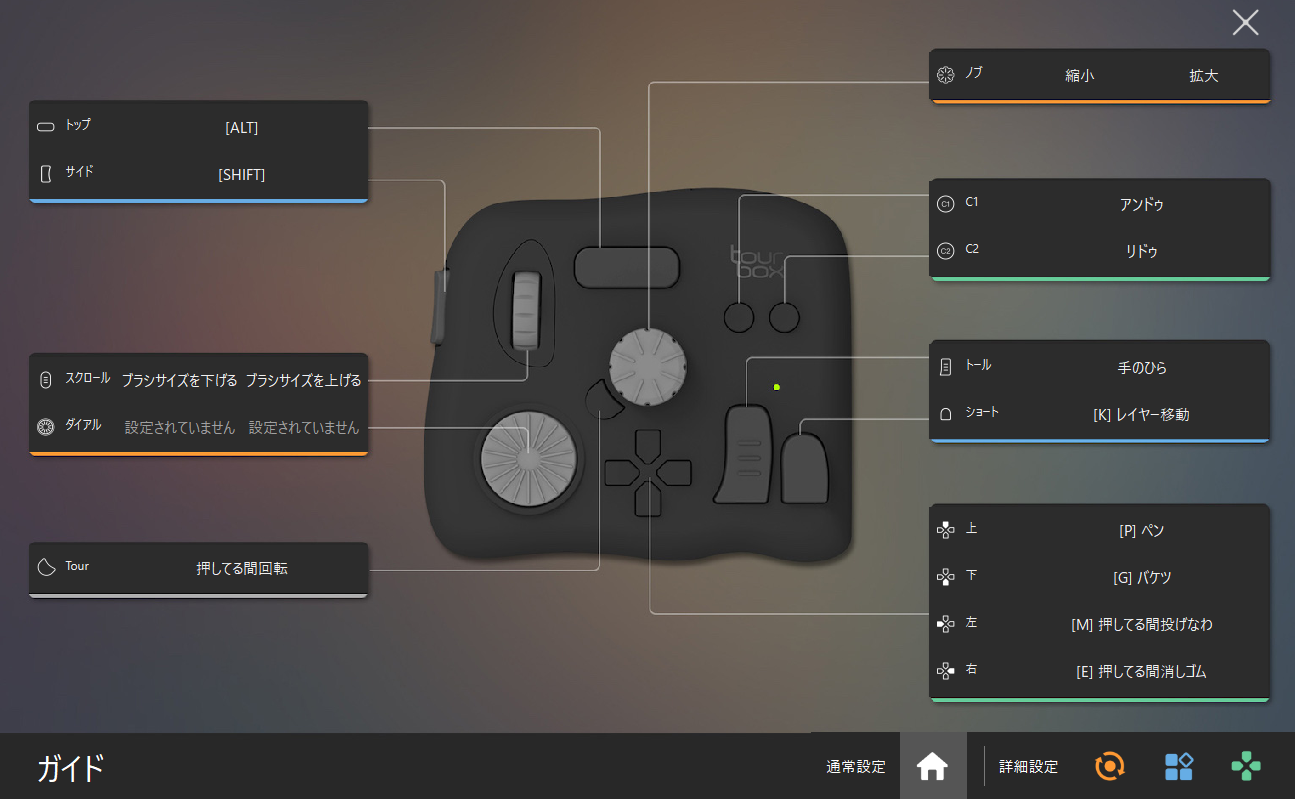
For me personally though—maybe it’s the size of my hand or just my habits—I kept accidentally touching the middle dial (the “Knob”). Since the Knob is assigned to change the brush size, every time I pressed C1 to Undo, my brush size would randomly change, which was super annoying man.
Also, I rotate the canvas A LOT when drawing lines, but there was no key mapped to reset the rotation by default.
After messing around with it for a bit, I realized the hard truth: this thing is pretty much useless unless you sit down and seriously customize it for your own workflow.
The struggle is real because I absolutely hate setting up macros and hotkeys… but I guess I have no choice.
My Old TABMATE Setup ⚙️
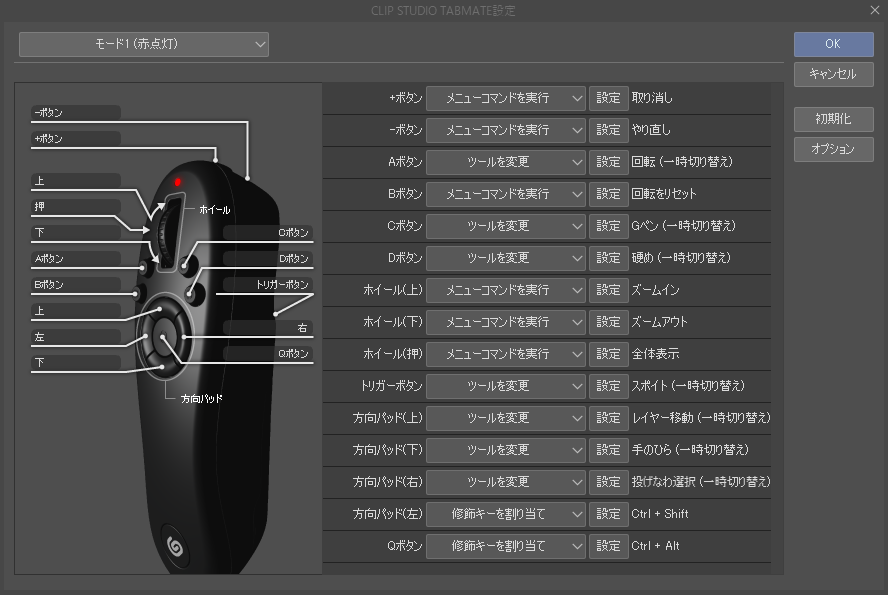
I definitely wanted to port over some of the settings I was used to from the TABMATE to the TourBox.
Undo/Redo, Zoom in/out, Canvas Rotate, Reset Rotation, Hand Tool, Eyedropper, Eraser (while held), and Ctrl+Shift (Select clicked layer) are absolute must-haves for me, so I mapped those first.
Not just for sketching or line art, but even when I’m coloring, I constantly use the Lasso tool to select areas and use the Move Layer tool to adjust things, so I needed those on there too.
My v1.0 Custom Setup ✨
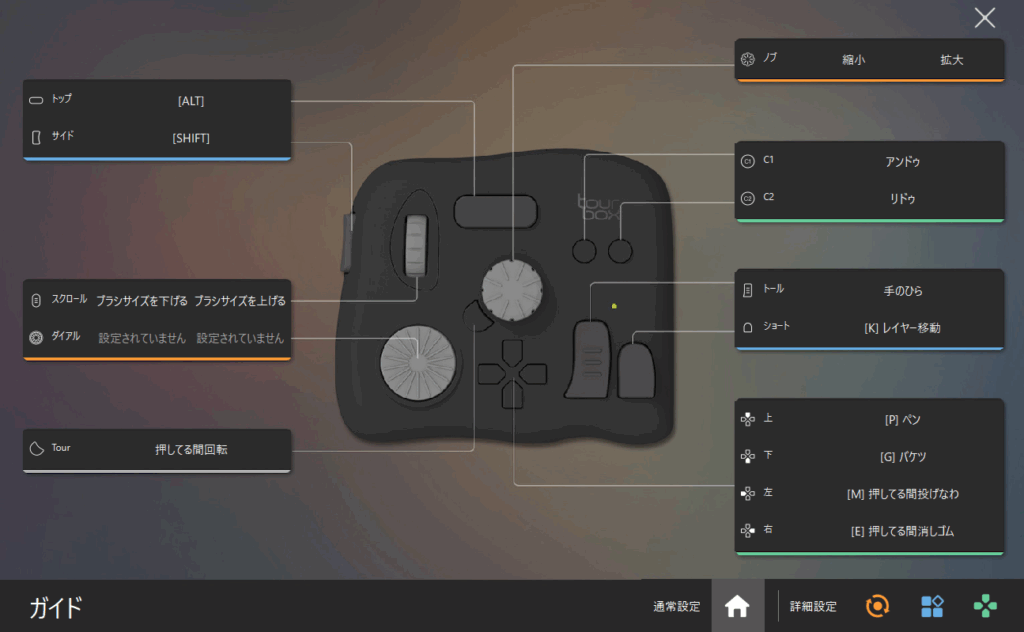
So, here’s how I ended up setting it up for now.
I mapped canvas zooming—the thing I use the most—to the middle Knob. Then, I set the ‘Tour’ button right next to it so that it rotates the canvas only while being held down. Basically, it acts exactly like holding down the ‘R’ key on a keyboard.
It’s the method where you hold the button and use the pen to rotate. Double-clicking it resets the rotation.
I put brush size increase/decrease on the left Scroll wheel.
For the thumb controls, I assigned the Tall button to the Hand tool and the Short button to the Move Layer tool.
Then on the D-pad, I mapped the Pen, Bucket, Lasso, and Eraser.
For Undo and Redo, I kept them on C1 and C2, just like in the default preset.
I actually left the Dial completely unassigned for now. I just couldn’t think of any commands I wanted to put there at the moment, so I’ll reconsider it after using this setup for a while.
I also set it up so that holding the Side button while scrolling changes the brush density.
I debated whether to make it control opacity or something else, but tbh I haven’t really solidified my coloring style yet. Once I figure out how I actually want to render things, I’ll probably tweak this again.
Things I Kinda Want to Add Later 🤔
I haven’t done it yet, but eventually, I think it’d be pretty sweet to register some layer operations as macros.
I don’t use them super constantly, but things like adding a new layer, clipping it to the one below, or changing the layer type.
Anyway, I barely even scratch the surface of CSP’s features, so the root of the problem is probably just that I don’t know what functions I *should* be mapping in the first place lol.
I guess I’ll just stick with this layout for a bit. If anything feels off while drawing, I’ll keep customizing it as I go!
Comment